Many of us know that Japan is facing a population crisis, with its population declining at a very rapid pace. This is leading to other problems, such as rural areas becoming depopulated without enough people to maintain the local infrastructure. One major factor is that many people are moving to major cities like Tokyo, Kyoto, and Osaka for better opportunities. To address this issue, the Japanese government has created a system where people can choose to donate part of their residence tax to other prefectures and, in return, receive gifts from those prefectures. This system is popularly known as ふるさと納税 (furusato nozei).
I recently tried this system and wanted to share the general steps for doing furusato nozei.
1. TL;DR#

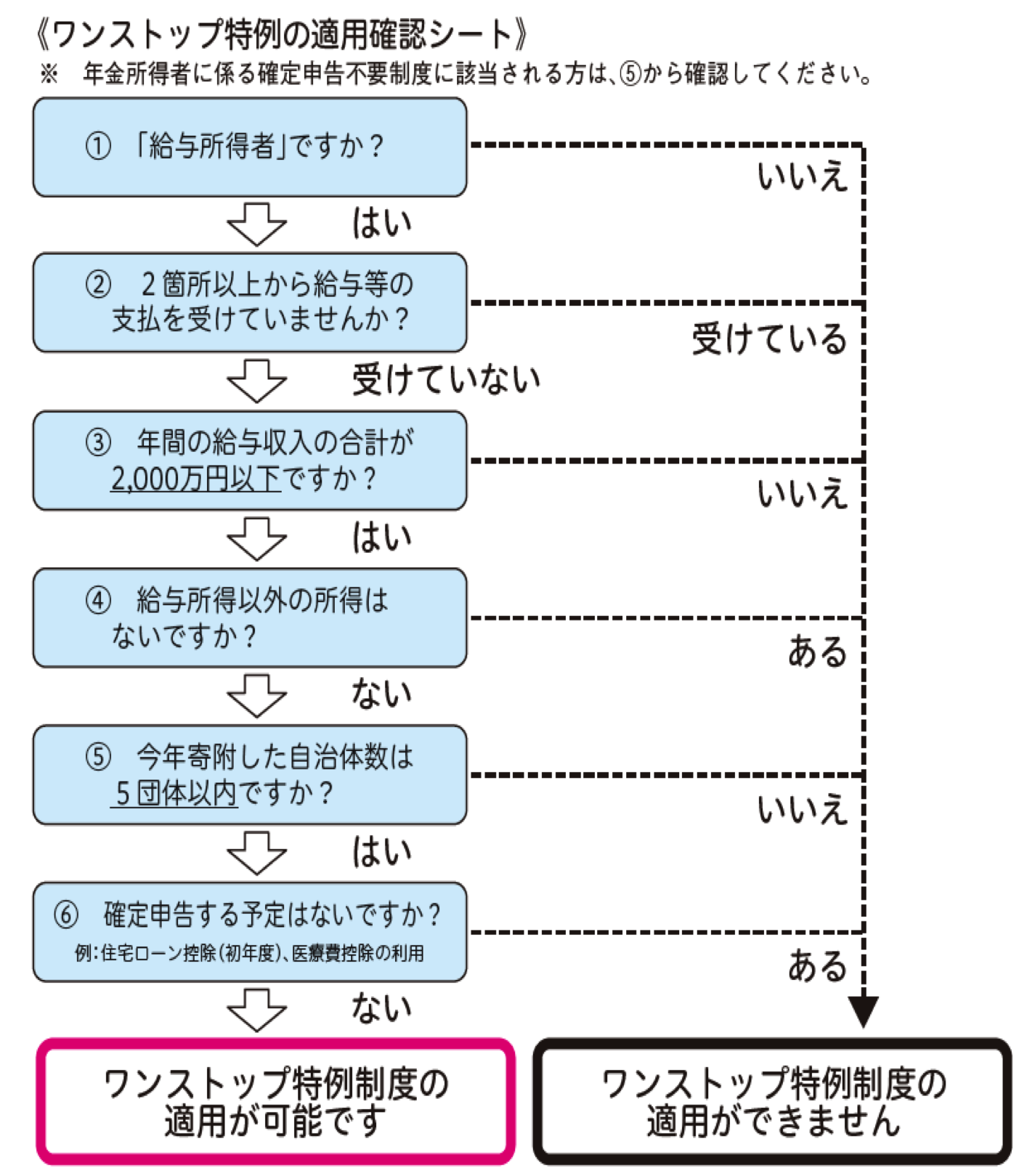
Another official flow diagram from national tax agency (NTA) that helps you decide whether you should use onestop application.
2. General flow#
- Calculate how much you can donate
- Apply for donations from popular furusato nozei sites up to the allowed amount minus 10-20K (to be on the safe side)
- Declare these gifts for tax purposes either through the One Stop process or 確定申告 (kakutei shinkoku - final tax application) from early February to March
3. Know your limits#
The first step is to know how much you can donate. Various websites allow you to calculate this limit. There are mainly two types of simulators: 簡単シミュレーション (simple calculation) and 控除上限額シミュレーション (deduction limit calculation) or sometimes 詳しシミュレーション (detailed calculation). I recommend using 控除上限額シミュレーション or 詳しシミュレーション as they allow you to enter more details such as your number of dependents and other deductions you may need to claim, such as medical expenses.
There are many calculators available:
I’ve found the 1st and 2nd calculators to be good, but feel free to try different ones. A few points to remember:
- If you accidentally donate more than your limit, the additional amount will be considered a regular donation and will not be deducted from your tax next year.
- These calculators provide a rough estimate of how much you can donate. To be on the safe side, donate 10-20K less than the calculated amount.
4. One Stop application vs 確定申告 (Final tax application)#
Before you proceed with your donation, you should understand how to declare these donations so that your tax gets reduced next year. There are mainly two ways to do this:
- One Stop Application (completely online, must be completed before Jan 10)
- 確定申告 (kakutei shinkoku - final tax application, done online around February)
4.1 One Stop Application#
The One Stop application requires less hassle if you satisfy the following conditions.
4.1.1 One Stop Application Conditions#
Condition 1: You don’t need 確定申告 (final tax application)#
You will qualify for this condition if:
- You are a regular employee and only apply for year-end tax adjustment through your employer. That is, you don’t have any additional deductions to claim such as medical expenses, house loans, private health insurance, etc.
You will not qualify for this condition if:
- Your annual income is above 20 million JPY
- You have additional income other than salary (use 確定申告 in this case)
- You have medical expenses or other private health insurance that you want to claim (use 確定申告 in this case)
Condition 2: Your donations are to no more than 5 different municipalities#
You can use the One Stop application only if you donate to a maximum of 5 different municipalities (prefecture + city combinations) throughout the year. Furusato nozei donations are accepted throughout the year, and if you want to declare your donations using One Stop, you should donate to 5 or fewer municipalities. Note that multiple donations made to the same prefecture + city combination are counted as one.
“Same municipality” means the same prefecture and city. See the following examples:
Example 1:
- Donate twice to
富山県立山町 - Donate 5 times to
富山県立山町 - Still counts as 1 自治体 (jichitai - local government)
Example 2:
- Donate to
富山県立山町 - Donate to
富山県富山市 - Counts as 2 自治体 (jichitai - local governments)
Condition 3: Application for each donation must be completed by Jan 10#
You must complete the One Stop application before Jan 10 of the year following your donation year. The One Stop application can be done in two ways:
1. Online using My Number card (Recommended)
- You will need your 4-digit My Number card password and e-sign alphanumeric password
- There are various sites that facilitate online authentication using My Number, such as:
- Different prefectures use different websites to handle their furusato applications, so please check before making donations
- Most of these portals need some time (usually 1-2 days) before your donation data becomes available for My Number authentication
2. Sending application via post to each local government
- You will need to download the application form, fill it out for each donation, and send it to each local government. Even if donations are to the same local government, you need to submit a form for each donation
- You will need to include the application and a document that can confirm your identity
- Sample Application of One Stop application via post
- Special One Stop Application Form (ワンストップ特例制度の申請用紙)
5. Apply for donations from popular furusato sites#
There are many furusato sites. A few of them are:
I personally liked furusato choice because of its wide range of products and ease of application, but it’s a personal preference. Others may offer a similar or better experience. Use whichever you like.
6. Common problems and gotchas#
Name matching issues#
- Ensure exact name match: Your name on the My Number card must match the donor’s name on the donation site. Otherwise, you will face issues when claiming the donations.
- Middle names and spaces: If your name has a middle name and spaces, the common practice is to remove the space between your first name and middle name.
- Katakana-only websites: Some One Stop authentication websites such as https://mypg.jp/ only allow you to enter katakana, so enter your name in katakana without spaces.
- Using em-dash (ー): Some people on Reddit have shared that adding an em-dash (ー) in place of spaces between first name and last name has helped them.
Processing time#
- Wait for data synchronization: One mistake I made was trying to use https://mypg.jp/ for My Number authentication immediately after making a donation. I tried multiple times and kept getting 本人確認エラー (authentication failure). It turns out I only needed to wait 1 day for the site to fetch my donation data, and it started working the next day.